Disclaimer: This guide was automatically translated by AI from the German original. Please verify commands and technical details before using them.
¶ Delete a partition with CMD
- Open Command Prompt (CMD) by pressing Windows key + R and entering
cmd. - Enter the following command:
diskpart
- List the disks to find the correct disk:
list disk
- Select the disk you want to delete:
select disk [disk-number]
(Example: select disk 3)
- List the partitions:
list partition
- Select the partition you want to delete:
select partition [partition-number]
- Delete the partition:
delete partition
If it is a protected partition, use the following command:
delete partition override
¶ Install curl
-
Download the files from here.
-
Extract the ZIP file and move the folder to
C:\Windows\System32\. -
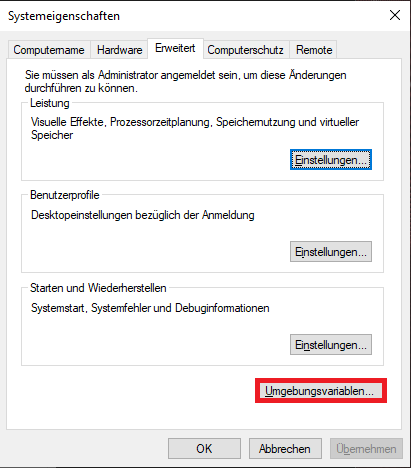
Open the Start menu, type
Edit system environment variables, and open it.
-
Click
Environment Variables; a new window opens. -
Search for
Pathand clickEdit. -
Click
Newand enter the path tocurl.exe:
C:\Windows\System32\curlin
- Confirm with
OK.
¶ TeamSpeak server autostart
-
Download RunasRob from this page.
-
Extract the ZIP file and go to the
4Bitdirectory (on 64-bit systems). -
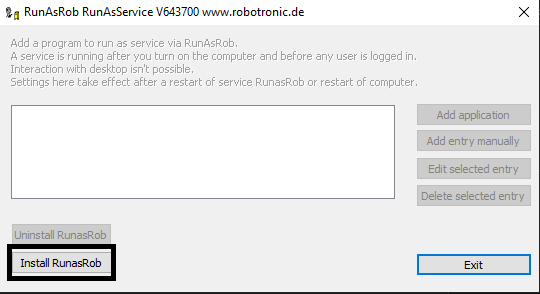
Run
RunAsService.exe.
-
Click the Install button and wait until the installation has completed.
-
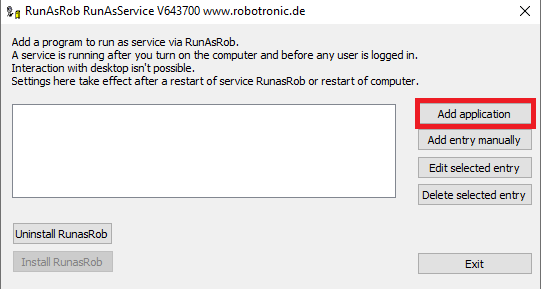
After installation, a new window opens:
-
Click
Add applicationand select the path to the TeamSpeak server EXE. -
Restart the computer. The TeamSpeak server should now start automatically.
The same procedure also works for SinusBot on Windows.
¶ Change username
- Press Windows key + R to open the Run dialog.
- Enter the following command:
control userpasswords2
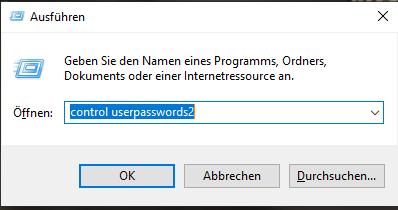
- Click
OK. A new window opens:
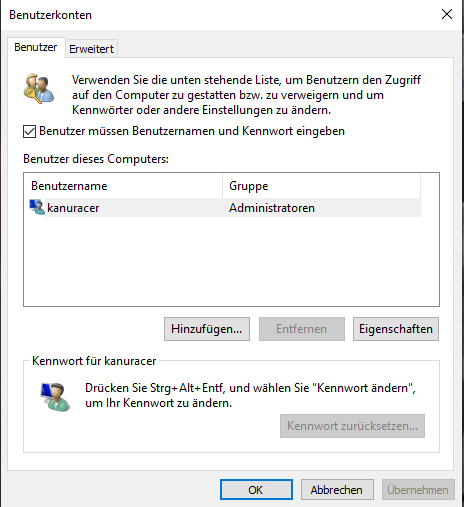
- Select the desired user and click
Properties:
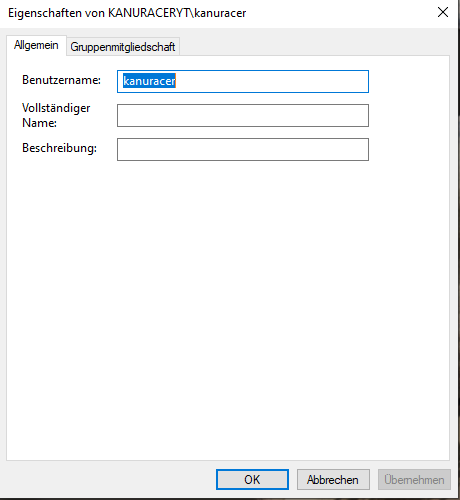
- Enter the desired new username.
¶ Script for mapping network drives
To automatically connect network drives after login, create a script.
-
Open an editor, for example Notepad++.
-
Define the username and password as parameters:
@echo off
cls
SET USER=username
SET PW=password
- Delete all existing network drives:
net use * /delete /yes
- Map the network drives:
net use X: \SERVERNAME\Share /user:%USER% %PW%
net use Y: \SERVERNAME\Share /user:%USER% %PW%
net use Z: \SERVERNAME\Share /user:%USER% %PW%
-
Save the script as a
.batfile and move it to the Startup folder. -
To find the Startup folder, open Run and enter the following command:
shell:startup
Warning: The password is stored in plain text in the script.
¶ Windows 11 context menu
If you do not like the new context menu in Windows 11, you can restore the old menu.
-
Download the batch file:
Download the batch file from here and run it as administrator.- To run the batch file as administrator, right-click the file and select Run as administrator.
- Confirm the security prompt if asked.
-
Restart the PC: After the restart, the old context menu is active again.
Alternatively, you can create your own batch file with the following content:
:start
@echo off
cls
echo .
echo -----------------------------------------------------
echo regedit context menu
echo kanuracer.eu
echo -----------------------------------------------------
echo .
echo regedit...
echo .
reg add "HKEY_CURRENT_USER\SOFTWARE\Classes\CLSID\{86ca1aa0-34aa-4e8b-a509-50c905bae2a2}\InprocServer32" /f /ve
echo .
echo -----------------------------------------------------
echo The computer must be restarted!
echo Press any key to restart
echo -----------------------------------------------------
echo .
pause
shutdown -r -t 0