Disclaimer: This guide was automatically translated by AI from the German original. Please verify commands and technical details before using them.
¶ Install Nextcloud Docker on Unraid
Back to overview: Unraid guides
¶ What is required?
¶ Docker
- MariaDB – linuxserver
- Nginx Proxy Manager – jc21
- Redis Server – jj9987
- Nextcloud – linuxserver
¶ Other tools
HeidiSQL
WinSCP
A domain that already points to your home network.
¶ Structure of the Nextcloud environment
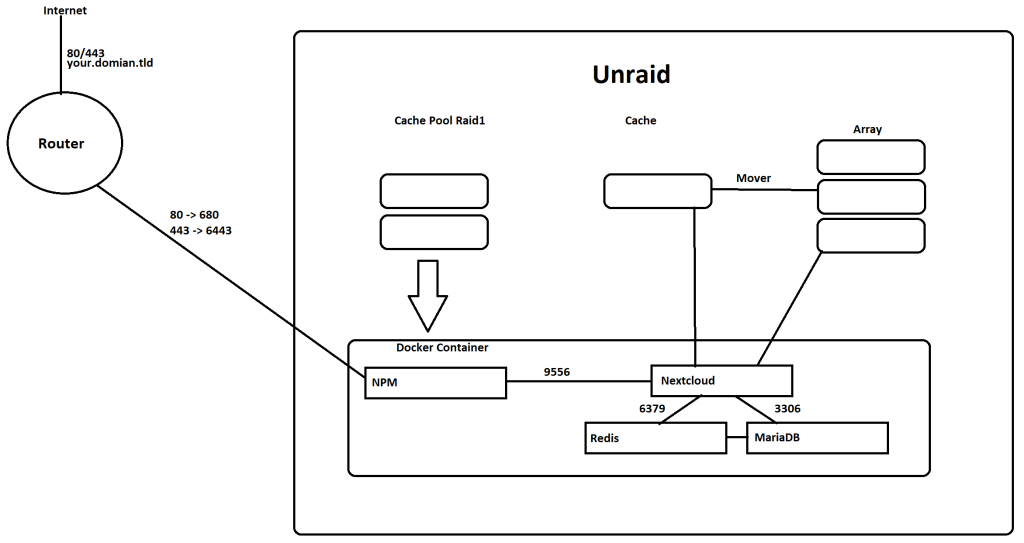
In my Unraid configuration, I have:
2 x 500 GB SATA SSDs as a cache pool in RAID 1 (dovm)
1 x 256 GB M.2 NVMe SSD as a pure write cache (Cache)
¶ MariaDB
¶ Installation
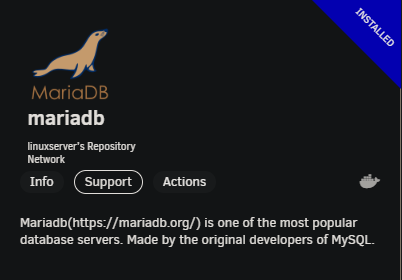
In Unraid, go to the APPS tab and search for the mariaDB Docker. I recommend the Linuxserver Docker here.
Click Install; you will be redirected to the configuration page immediately.
¶ Configuration
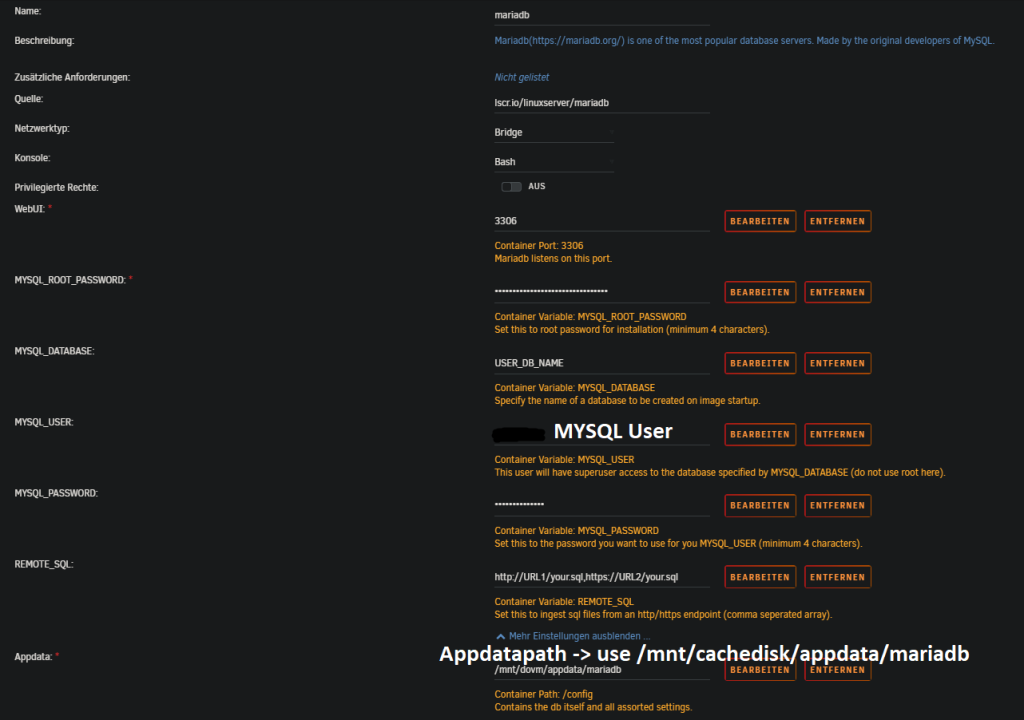
After the Docker container is installed, check again whether it has started.
¶ Create the database connection
Download HeidiSQL and open it:
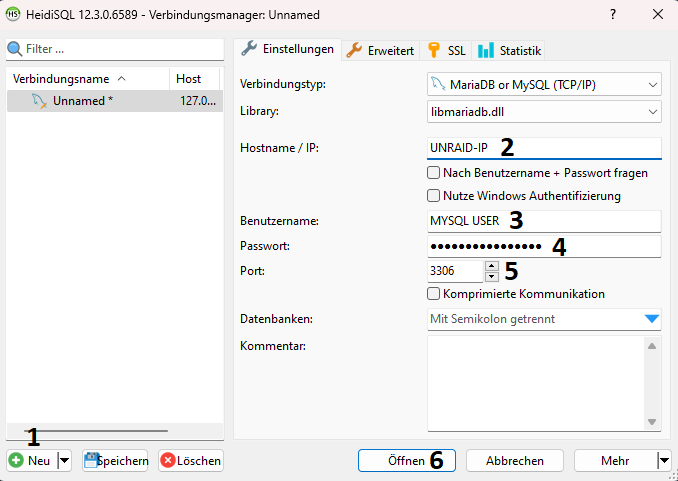
- Create a new connection.
- Enter the IP address of your Unraid server.
- Enter the root user.
- Enter the password you set during Docker installation.
- Enter the port of your MariaDB. 3306 is the default port.
- Open the connection.
¶ Create the database
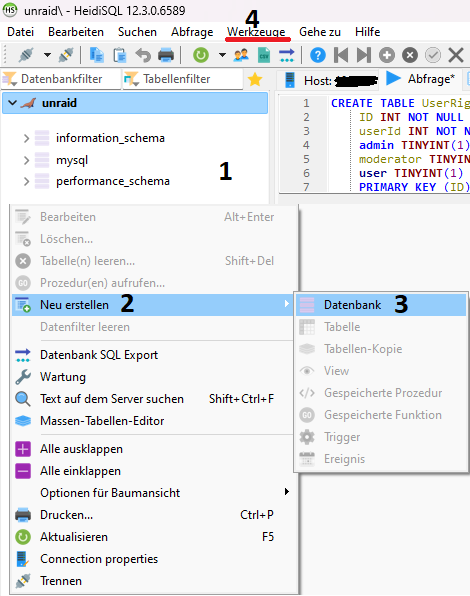
- Right-click in the left panel.
- Click
Create new. - Click
Databaseand enter the name of the database. In this guide I use the namenextcloud. - Click
Tools>User managerin the menu bar.
¶ Create and authorize a user
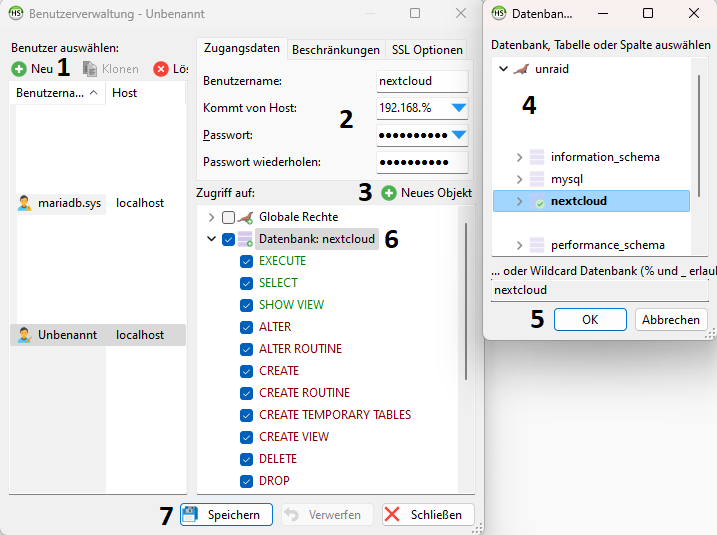
- Click
New. - Enter the username. In this guide I use
nextcloud. SetFrom hostto172.17.%and enter the password. - Click
Add object. - Select the
nextclouddatabase. - Click
OKto confirm your selection. - Grant global permissions on the database.
- Save your settings.
¶ Redis server
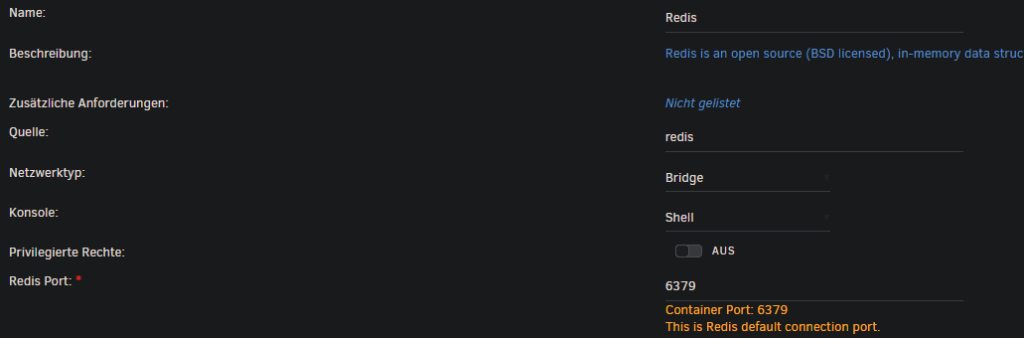
To make Nextcloud a little faster, we need a Redis server. Search for Redis again under APPS and install the Docker container from jj9987.

¶ Nextcloud
¶ Create a share
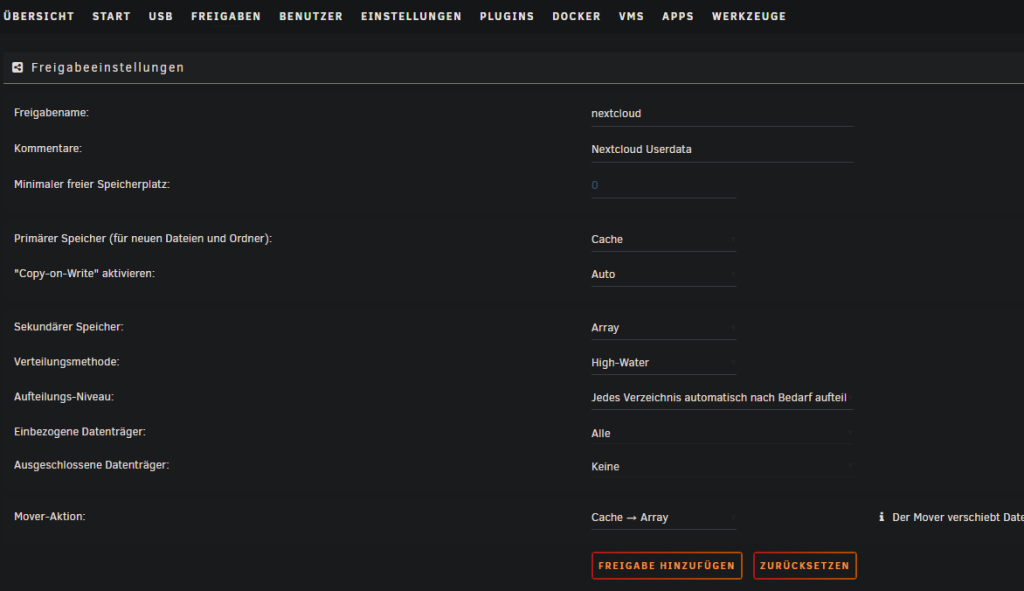
Before Nextcloud can be installed, a share for the user data must be created.
In the Unraid WebUI, click Shares > Add Share. Assign a name. In this guide I use nextcloud.
Select your write cache as primary storage and your array as secondary storage.
All user data is now written to the cache and later pushed to the array by the mover.
¶ Install Nextcloud
Now that the share for user data exists, Nextcloud can be installed.
Search for Nextcloud again under APPS. I again recommend the Linuxserver Docker.
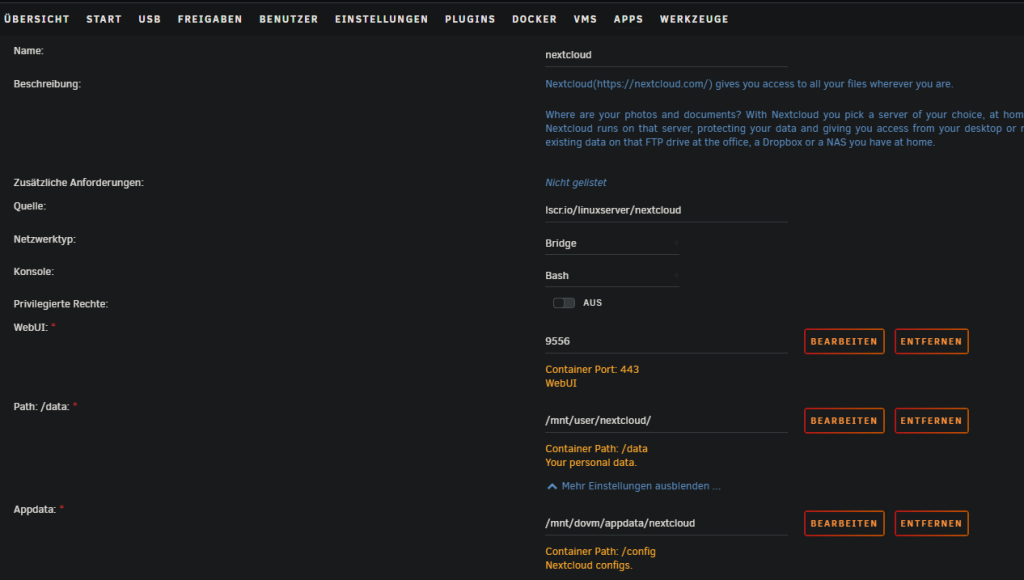
For WebUI, set a port other than 443. In this guide I use 9556.
For Path: /data, enter the share you just created for user data. In my case: /mnt/user/nextcloud/.
After the Docker container is installed, you can open the WebUI: UNRAID-IP:9556.
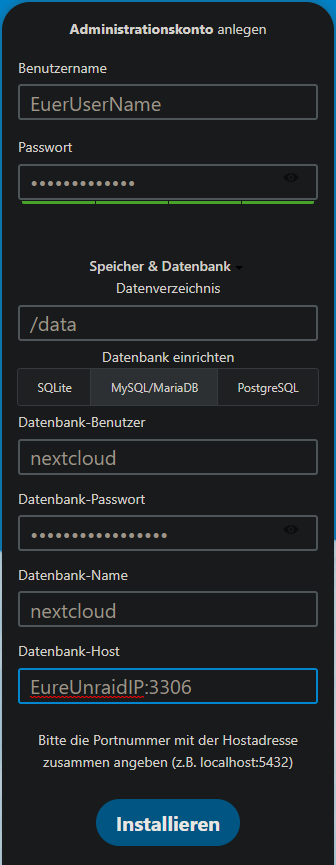
Enter your desired username and password.
Click the Storage & database tab. Leave the data directory as it is. Under database, select MySQL/MariaDB and enter the database, user, and password. The host must be entered as UNRAID-IP:3306.
Then click Install.
If an error appears saying that you cannot connect to the DB, you may need to copy the IP address from the error message and add it to the HeidiSQL user management entry for the Nextcloud user.
¶ Nextcloud errors
After installation, you will see several errors under Administration settings > Overview:
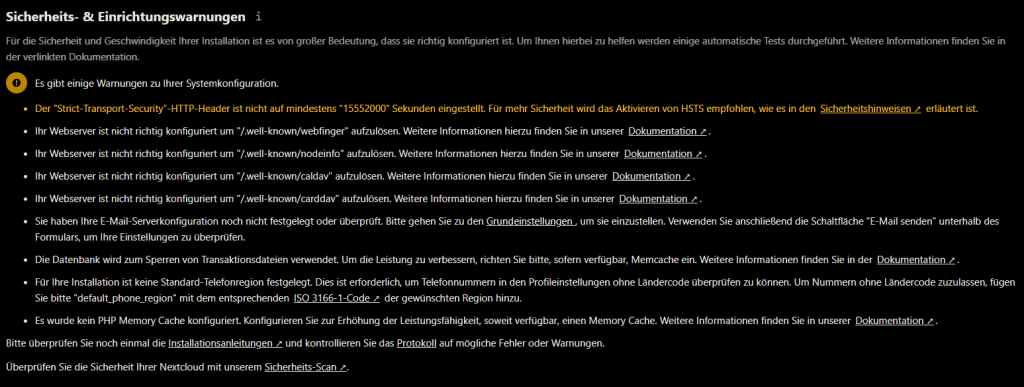
Some can be fixed by adjusting config.php. For this you need WinSCP or a comparable SFTP client.
Connect to your Unraid server via SFTP, navigate to the Nextcloud directory /mnt/user/appdata/nextcloud/www/nextcloud/config/, and open config.php.
Now add or change the following entries:
'memcache.local' => '\\OC\\Memcache\\APCu',
'memcache.locking' => '\\OC\\Memcache\\Redis',
'redis' =>
  array (
    'host' => 'UNRAID-IP',
    'port' => 6379,
    'timeout' => 0.0,
    'password' => '',
  ),
  'overwrite.cli.url' => 'https://your.domain.tld',
  'overwriteprotocol' => 'https',
  'trusted_domains' =>
  array (
    0 => 'UNRAID-IP:9556',
    1 => 'your.domain.tld',
  ),
  'trusted_proxies' =>
  array (
    0 => 'UNRAID-IP',
  ),
  'default_phone_region' => 'DE',
  'mail_smtpmode' => 'smtp',
  'mail_smtpsecure' => 'ssl',
  'mail_sendmailmode' => 'smtp',
  'mail_smtpauthtype' => 'LOGIN',
  'mail_smtpauth' => 1,
  'mail_smtpname' => 'EMAIL-Address',
  'mail_smtppassword' => 'PASSWORD',
  'mail_from_address' => 'cloud',
  'mail_domain' => 'domain.tld',
  'mail_smtphost' => 'smtp.hoster.de',
  'mail_smtpport' => '465',
In the end, the config should look roughly like this. instanceid and similar values will differ from your config:
<?php
$CONFIG = array (
  'datadirectory' => '/data',
  'instanceid' => '',
  'passwordsalt' => '',
  'secret' => '',
  'dbtype' => 'mysql',
  'version' => '27.0.1.2',
  'dbname' => 'nextcloud',
  'dbhost' => 'UNRAID-IP:3306',
  'dbport' => '',
  'dbtableprefix' => 'oc_',
  'mysql.utf8mb4' => true,
  'dbuser' => 'nextcloud',
  'dbpassword' => 'Nextcloudtutorial',
  'installed' => true,
  'memcache.local' => '\\OC\\Memcache\\APCu',
  'memcache.locking' => '\\OC\\Memcache\\Redis',
  'redis' =>
  array (
    'host' => 'UNRAID-IP',
    'port' => 6379,
    'timeout' => 0.0,
    'password' => '',
  ),
  'overwrite.cli.url' => 'https://your.domain.tld',
  'overwriteprotocol' => 'https',
  'trusted_domains' =>
  array (
    0 => 'UNRAID-IP:9556',
    1 => 'your.domain.tld',
  ),
  'trusted_proxies' =>
  array (
    0 => 'UNRAID-IP/24',
  ),
  'default_phone_region' => 'DE',
  'mail_smtpmode' => 'smtp',
  'mail_smtpsecure' => 'ssl',
  'mail_sendmailmode' => 'smtp',
  'mail_smtpauthtype' => 'LOGIN',
  'mail_smtpauth' => 1,
  'mail_smtpname' => 'EMAIL-Address',
  'mail_smtppassword' => 'PASSWORD',
  'mail_from_address' => 'cloud',
  'mail_domain' => 'domain.tld',
  'mail_smtphost' => 'smtp.hoster.de',
  'mail_smtpport' => '465',
);