Disclaimer: This guide was automatically translated by AI from the German original. Please verify commands and technical details before using them.
¶ Optimize Nextcloud on Unraid
Back to overview: Unraid guides
¶ Move log files
Create another folder under logs for this. Open /mnt/user/logs/ again in WinSCP and add a folder named nextcloud. Then right-click the folder > Properties and assign the following permissions:
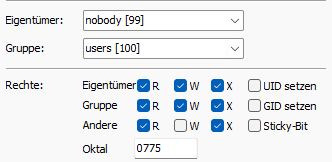
Open the Docker terminal (click the Nextcloud Docker icon > Console) and enter the following command:
mkdir /app/www/logs
The path still has to be passed into the Docker container in the Docker configuration.
You can find this at the very bottom under + Add another Path, Port, Variable, Label or Device.
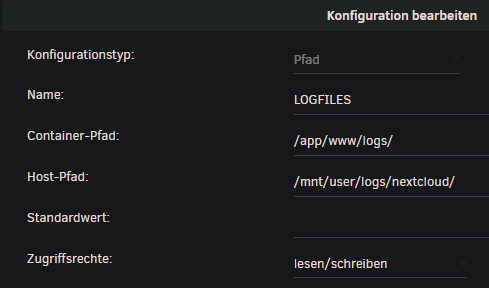
Then add two more lines to config.php:
'loglevel' => 0,
  'logfile' => '/app/www/logs/nextcloud.log',
¶ Automatically empty trash: files older than 7 days after 7 days
Add these two lines to config.php:
'trashbin_retention_obligation' => '7, 7',
  'versions_retention_obligation' => '7, 7',
¶ Maintenance window
Add the following to config.php:
'maintenance_window_start' => 2,
¶ External uploads larger than 512 MB
For this, the client max body size value must be adjusted in this config: /mnt/user/appdata/nextcloud/nginx/site-confs/default.conf.
Change client_max_body_size 512M; to client_max_body_size 0;.
¶ Raise PHP limits
To raise PHP limits such as upload limit, memory limit, and max file size, a few variables must be set in the Docker configuration. You can find them at the very bottom under + Add another Path, Port, Variable, Label or Device.
Set the following variables:
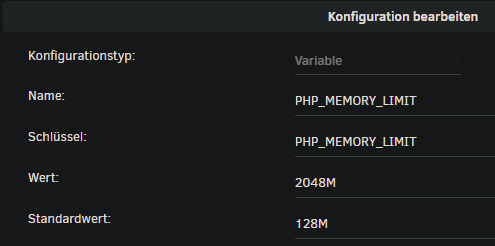
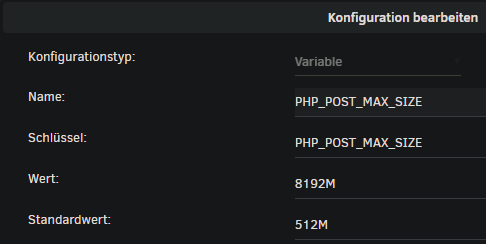
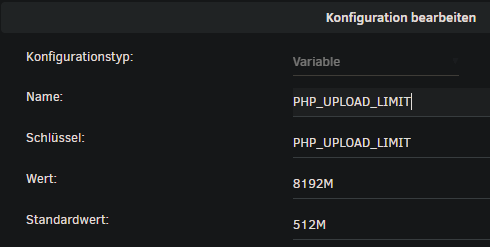
Then click Apply.